September 2026 at Bindplane: Bindplane Agent and a new Overview page
Bindplane Agent is here, the newly released AI assistant that builds, edits, and explains telemetry pipelines from plain language. The Overview page is also new and shows your whole deployment as one flow with live throughput on every edge.

Also this month, a new BDOT 1.107.0 release, and you can start a configuration from a Full-Pipeline Blueprint. Here’s what happened in the last month.
▶️ Prefer to watch? The September Community Call is streamed live on YouTube. 👇
What shipped
Pipeline Intelligence started with recommendations. Add a regex parser, drop debug logs, delete empty values. Then it learned to read live telemetry samples and detect log types, and eventually to generate processor bundles from a sentence. All of that lived inside one processor node, so you still had to know which node to open and what to ask for.
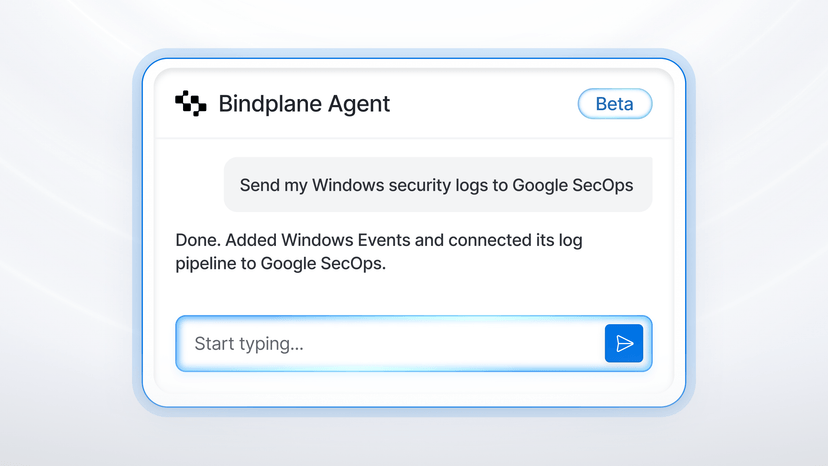
Bindplane Agent removes that constraint. If you've used Pipeline Intelligence inside a processor node, this is the same but extended to your whole pipeline. Open it from anywhere by clicking the button in the bottom right, or by hitting t on the keyboard, and describe the outcome.
"Collect my Windows security logs and send them to Google SecOps" becomes a source, a destination, and the wiring between them, each node appearing in the graph as it's built.
"Set the batch size on my batch processor to 200" is an in-place edit with no form hunting.
Ask which sources send logs and where they go, or what a specific processor did to the data, and it answers without changing anything, which matters most for pipelines you inherited.
Chat history is saved per user and project and deleted after 14 days, with titles and messages encrypted at rest when a project encryption key is configured. Credentials are masked and PII in telemetry samples is redacted before anything leaves Bindplane. Bindplane Agent is in private beta, and Justin's launch post has the full walkthrough and the request form.

The new Overview page is the other big change, and it's the first thing you see when you open Bindplane. It has two tabs.
Visualize draws the whole deployment as one graph. Configurations sit on the left with their collector counts, gateways in the middle, destinations on the right, and every edge is sized by throughput with the GB/h printed on it. Toggle between logs, metrics, and traces and filter down to the configurations or destinations you care about. Small configurations and destinations roll up into an Other node so the graph stays readable at scale, and a destination that has stopped receiving data shows up greyed out instead of hiding in a table. If you have ever tried to answer "where is all this data actually going" from a list of configurations, this is the page for that.

Summary is the health check. Collector health rolls up to one percentage, with counts for healthy, disconnected, incompatible, and errored collectors and a link straight to the ones that need attention. Configuration rollouts show how many are current everywhere and how many failed. Collector versions split into up to date, recent, and outdated, which is a fast way to see how far behind a fleet has drifted. Below that, a throughput chart plots data in against data out over 24 hours, 30 days, or 90 days, for all destinations or one, with the reduction percentage called out. That number is the one most people want when someone asks what the pipeline is actually saving.

New features and integrations
BDOT 1.107.0 carries a Lookup fields processor performance improvement worth calling out. CSV lookups now run fully concurrent with table reloads, and the in-memory index for large tables takes a fraction of the space it used to. If you run large lookup tables in hot pipelines, this release is worth the upgrade on its own.
Two more worth knowing about:
- For Google SecOps, the Unroll processor is available in SecOps pipelines (Cloud today, on-prem in the next release), the region list is complete with a custom-region field, and Data RBAC ingestion labels can be enabled per label. SecOps destination docs.
- Full-Pipeline Blueprints got a “Build from Blueprint” option in the configuration wizard, platform tags (Linux, Windows, macOS, Kubernetes) so the wizard only offers blueprints that fit, and the ability to keep, swap, or skip the bundled source and destination when you apply one. Blueprints docs.

What we wrote and where we showed up
Beyond the Bindplane Agent launch post, Austin from Dynatrace and myself wrote about redacting PII at the edge while keeping it searchable. The pipeline salts and hashes sensitive identifiers before they leave the edge, so nothing lands in plain text, but an analyst who knows a specific value can still hash it and search for it.
We also published a GrrCON preview covering what we're demoing at booth 101 and why a practitioner conference in Grand Rapids is our kind of room.
On the open source side, Blitz v0.20.0 is out. The telemetry generator now exposes its own internal telemetry to anything that embeds it, the data library has new samples, and BDOT's embedded workflow picked up the fixes. Release notes.
What we're working toward
Next stop is GrrCON at DeVos Place in Grand Rapids, September 24–25, booth 101. If you're in Michigan and care about what your SIEM bill looks like, come find us. After that we're heading to KubeCon + CloudNativeCon North America in Salt Lake City, November 9–12, to talk OpenTelemetry pipelines, OpAMP, and collector fleets. In the meantime, check out the Bindplane Agent, upgrade to BDOT 1.107.0 if you run lookup tables, and tell us what you think in the community Slack.
See you in October.


 Slack
Slack GitHub
 x.com
x.com LinkedIn