Full-Pipeline Blueprints Are Here: Source, Processors, and Destination in One Click
Insert a complete, working pipeline — not just the processors in the middle — and start shipping telemetry the same day.

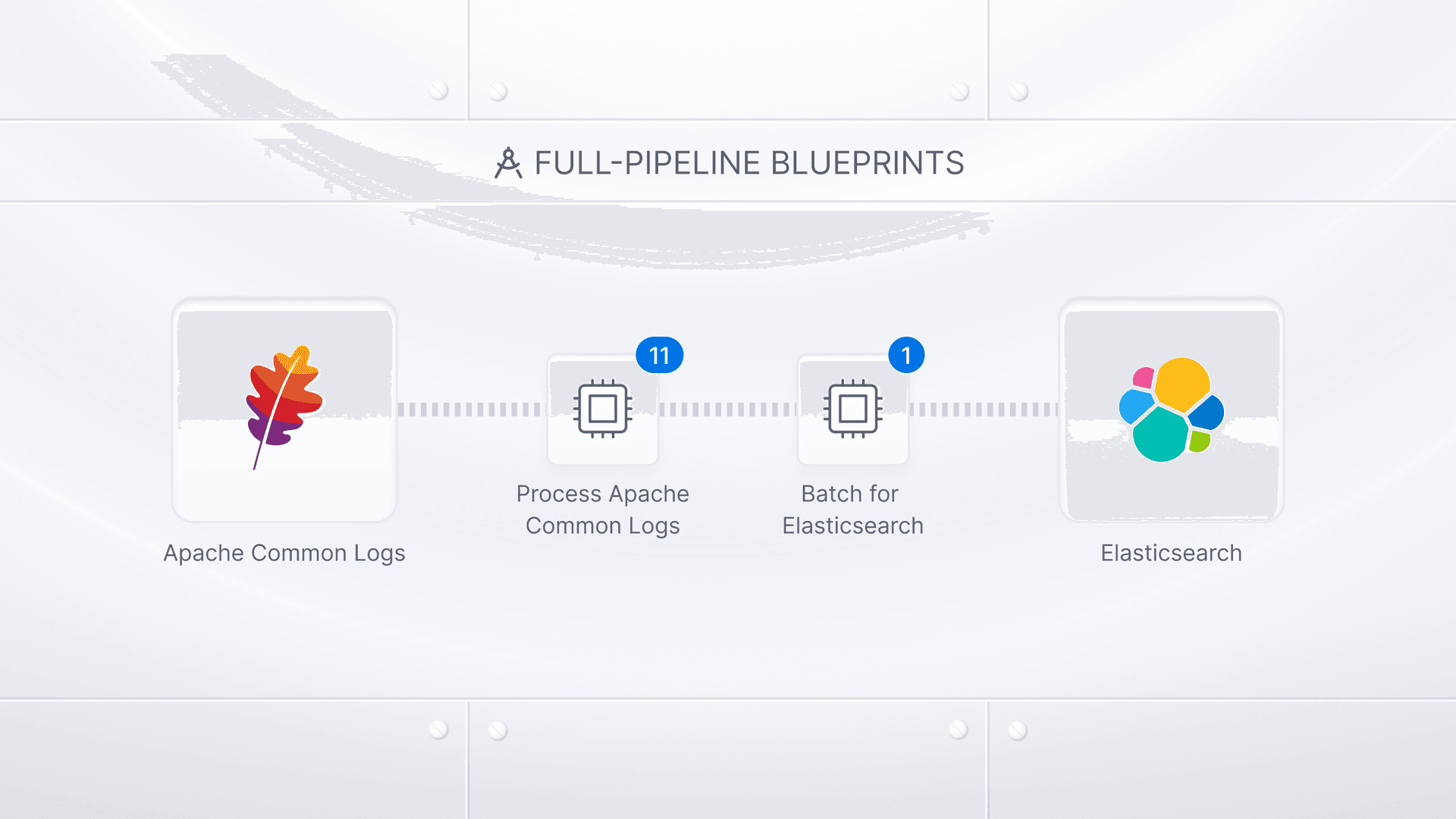
Full-Pipeline Blueprints are now available in the Blueprints library. Instead of dropping in a processor bundle and then figuring out how to make it work with your source and destination, you insert one full-pipeline blueprint and get the whole pipeline:
- The source that collects the data
- The processors that clean it up
- The batching that makes the backend happy
- The destination it lands in
Blueprints launched as processor bundles, and that solved the repetitive middle of the problem. But the middle was never the whole job. You still had to know which source type to add, which parameters mattered, how to batch for your backend, and how to route it all together. That changes now.
Five blueprints ship in this first batch. They cover the sources we get asked about most.
Ingest and Process Apache Common Logs for Elasticsearch takes Apache HTTP Server access logs in Common Log Format and optimizes them for Elasticsearch: CLF fields parsed, health checks and static asset requests filtered out, HTTP status codes mapped to OTLP severity levels, sensitive data masked, high-cardinality fields removed, Elastic Common Schema fields added, successful responses sampled, error bursts deduplicated, and the results batched for delivery. Eleven processors, one source, one destination.

Ingest and Process NGINX Logs for Elasticsearch does the same job for NGINX access logs in combined log format: format and timestamp parsed, health checks and static assets filtered, status codes mapped to OTLP severity, sensitive data masked, ECS fields added, successes sampled, error bursts deduplicated, empty fields dropped, results batched. Eleven processors, one source, one destination.

Standardize & Route Windows Events for Google SecOps standardizes Windows Events for SecOps, then routes each channel — SYSMON, POWERSHELL, DNS, MSSQL, WINEVTLOG — through its own batch processor, so batches stay homogeneous per SecOps log type.

Enrich Palo Alto Security Events for Dynatrace takes PAN-OS security logs over TCP and UDP and turns raw syslog into events an analyst can pivot on. Header stripped, then each log type parsed on its own: THREAT, TRAFFIC, AUTHENTICATION, GLOBALPROTECT, USERID, and nine more. Parsed events get MITRE ATT&CK context from log Type, Threat/Content Type, Event ID, Action, and Category, covering brute force, C2, exploit and malware detection, DNS tunneling, data exfiltration, and eleven other techniques. Then batched for Dynatrace. Thirty-two processors, two sources, one destination.

Reduce and Normalize Host Telemetry for Dynatrace is the cost-control one. Host metrics and journald logs in one pipeline: idle CPU time and low-memory processes dropped, high-cardinality process and filesystem attributes stripped, per-core CPU collapsed to a single host-level value, journald's raw fields renamed to conventional OpenTelemetry names, results batched for Dynatrace. Nine processors, two sources, one destination.

What's New
- The whole pipeline, not just the middle. A Full-Pipeline Blueprint includes the source, the processor nodes, any routing connectors, and the destination. Drop it into your config, configure the source and destination credentials if needed, and you’re ready to go!
- Preview before you commit. Every blueprint shows a pipeline preview: the exact nodes, the numbered processors inside each one, and the routes. You know what you're getting before it touches your configuration.
- Routing included where it matters. The Windows Events blueprint ships with a routing connector and per-route batching already configured — the kind of structure that takes real time to build correctly by hand.
- Yours after insertion. Blueprints are a starting point, not a black box. Every node is a Bindplane resource: rename it, edit a processor, change the destination credentials, delete what you don't need.
Why It Matters
The gap between "I have Apache logs" and "I have clean, cost-controlled Apache logs in Elasticsearch that my team can actually query" is a day of work if you know Bindplane well, and considerably more if you don't. Most of that day isn't spent on the interesting part. It's spent looking up the right regex for a CLF timestamp, remembering which fields blow up your index cardinality, and figuring out how to batch for a backend you've never sent data to before.
- Time to first useful data drops from a day to minutes. The pipeline is already assembled and already correct.
- Best practices are the default, not the upgrade. Filtering, masking, sampling, and cardinality control ship in the blueprint. Nobody has to remember to add them later.
- New Bindplane users get a working reference. Insert a blueprint, then read it. It's the fastest way to learn what a well-built pipeline looks like.
- Consistency across teams. When five teams onboard Apache logs, they get the same pipeline instead of five variations that drift apart over the next year.
Try It Today
Open the Blueprints library in Bindplane, pick a full-pipeline blueprint, and preview it. When you insert it, it appears as a group on your pipeline, ready to configure with your own credentials and endpoints.
These are the first two. More full-pipeline blueprints are on the way, covering more sources and more destinations — and if there's a combination you'd like to see next, tell us in the Bindplane community Slack.
For full details, see the documentation.
Bindplane is a platform for building and deploying OpenTelemetry-based telemetry pipelines at scale.


 Slack
Slack GitHub
 x.com
x.com LinkedIn