Redact PII at the edge — and still be able to search for it
Hash sensitive fields in your log pipeline before they ever reach your backend, then let support find the exact log line by typing in the raw value. Here's the full setup, from pipeline to dashboard.


Ask a platform team why their application logs aren't in their observability backend and you'll often get a one-sentence answer:
"We can't, there's PII in them."
And, that's where the conversation ends. The logs stay in a silo. Or, they don't get collected at all. The team loses the troubleshooting signal, and nobody revisits the decision because the alternative looks like a compliance violation.
Application logs in healthcare, aviation, insurance, and retail are full of personal information that should not be stored in plain text. Phone numbers, national ID numbers, credit card numbers, booking references. PCI DSS, HIPAA, and GDPR all have opinions about that.
But "we can't collect these logs" is the wrong conclusion. The actual requirement is narrower than it looks.
The requirement isn't "delete it" — it's "make it unreadable but still matchable"
Here's the case that breaks the naive approach.
A customer calls support about a failed transaction. They read out their account number over the phone. The support engineer needs to find the log lines for that customer right now, on that call.
If you dropped the field, you can't. If you stored it in the clear, you've got a compliance problem. What you actually need is a field that is unreadable at rest but deterministically matchable: you can't browse it, you can't extract it, you can't run analytics on the raw values. But if someone hands you the raw value through an approved channel, you can find the corresponding record.
That's a hash. And because a hash is deterministic, you hash the search input too, and match hash to hash.
With Bindplane you can take unencrypted data as a search parameter and find the corresponding hashed data in the logs allowing support to identify and troubleshoot issues without having to expose and store unencrypted information that might violate PCI, PII, and HIPAA.
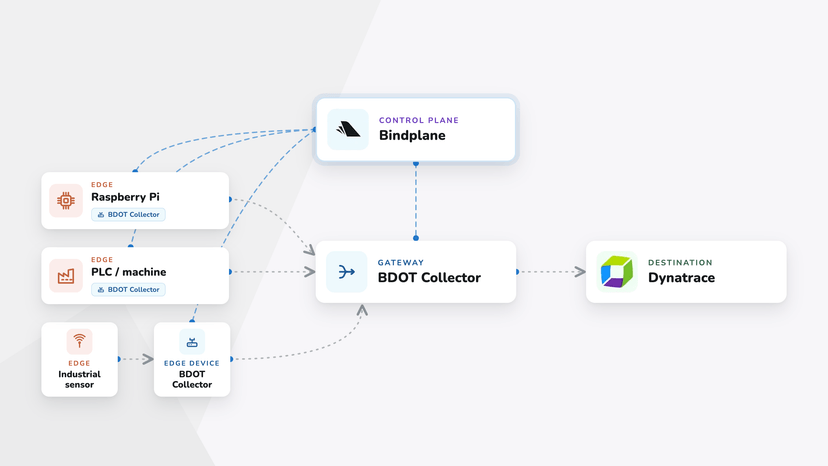
It happens at the edge.
The raw value is dropped in the pipeline, in the collector, before it is ever transmitted to or stored in your backend. Your observability vendor never receives it.
We'll build the simplest working version first: hash the field, ship it, search it. Once that clicks, the Advanced Concepts section at the end covers salting, which is what you'd add before running this in production.
What we're building

Step 1 — Start with sensitive logs
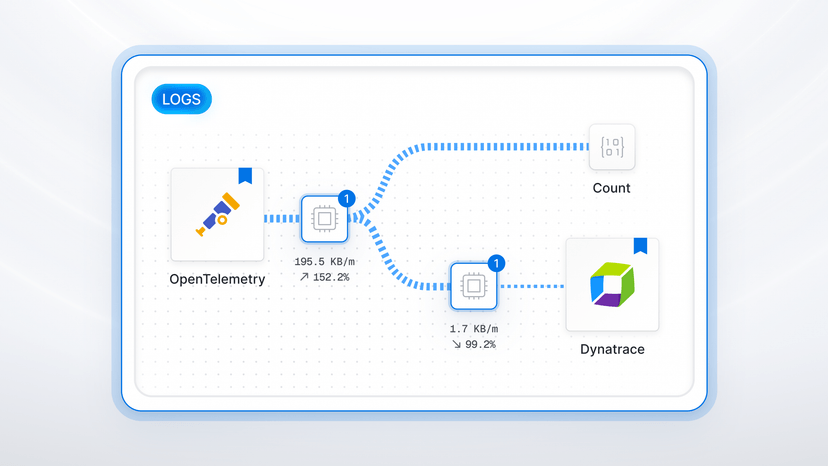
I'll showcase a pipeline that's already sending unredacted logs to Dynatrace. Don't worry, this is all dummy data. 😁

You see there's an SSN field (user["ssn"]). That's what I want you to hash.
Step 2 — Add the redaction processor
Add the Redact sensitive data processor. Select "Hashing" as the redaction strategy

Step 3 — Choose the hashing algorithm
Select the SHA-1 hashing algorithm.
The algorithm has to match what your query side can compute.
If your backend can't produce the same hash from a search input, the whole workflow breaks. You'll have unreadable fields and no way to match them. Bindplane and Dynatrace both support SHA-1, so that is what we use.

Step 4 — Redact keys vs. ignore keys
This is the step that can trip you up, so it's worth being precise.
The processor works from two lists. Redact keys are the fields you want hashed. Ignore keys are the fields you want explicitly left alone.
Add ssn to the Redacted Keys list. The processor hashes the value in place: the field stays where it is, but the raw value is replaced with its SHA-1 hash before the log ever leaves the collector. There's nothing left to delete.
Redact narrowly. Every field you hash is a field you can no longer aggregate, group by, or alert on. Hash the identifiers that carry personal data. Leave operational metadata untouched, like status codes, ports, durations, service names, etc.

Step 5 — Save, roll out, and confirm the raw value is gone
Save the configuration.

And, roll it out to collectors.

Query the logs in Dynatrace. The user.ssn field now carries a hash instead of the raw value.

This is the compliance checkpoint. The sensitive value was redacted in the collector. The backend never even sees the raw value.
Step 6 — Make it searchable again
Now the part that makes redaction survivable for the support team.
Build a dashboard with a variable for the SSN value. This value is used to filter logs.
Support pastes in the raw SSN to troubleshoot. The dashboard hashes it with the same SHA-1 function and filters all logs by the resulting hash. Support never sees anyone else's data, and never needs access to raw values in the first place. They only ever see records matching a value the customer supplied.
Here's the DQL statement for the dashboard.
1fetch logs
2| parse content, "JSON:parsed"
3| filter matchesPhrase(parsed[user][ssn], hashSha1($ssn))
4| fields timestamp, service = parsed[service][name], user_id = parsed[user][id], ssn_hash = parsed[user][ssn]
5| sort timestamp desc
6| limit 200
That's the core workflow: unreadable at rest, matchable on demand. Before you run this in production, read the Advanced Concepts section. A bare hash of a low-entropy field like an SSN needs one more ingredient to actually be safe.
Beyond fixed fields: pattern-based redaction
Hashing named keys handles structured data. The harder case is sensitive data buried inside an unstructured message body like a card number in a stack trace, an email address in a debug string.
That's what regex-based custom redaction is for: match the pattern anywhere in the record and redact it, without knowing in advance which field it landed in.
This has historically been difficult to implement, but Bindplane makes it stupid simple, because we support custom redaction with regex.
Here's a great example. If the log message includes a credit card number, you can write a Regex in the Custom Redaction Rules to match a credit card number.

Where this applies
The fields that actually drive this work:
- National ID / social security numbers
- Credit card numbers and cardholder data (PCI DSS)
- Patient identifiers and health records (PHI / HIPAA)
- Customer email addresses and phone numbers
- Airline passenger name records and booking references
- Account numbers and internal customer IDs
Advanced Concepts: making it production ready with a salt
The walkthrough above hashes the raw value directly. That's the right way to learn the workflow, but it is not the way to ship it.
A plain hash of a low-entropy field is not the protection it looks like. A national ID, a phone number, or a card number comes from a small, enumerable space. Anyone who gets your logs can hash every possible value and build a lookup table. For a 9-digit identifier that is about a billion hashes, minutes of work on a laptop. The strength of the hash function does not change this. An unsalted SHA-1 of an SSN is reversible.
The fix is a secret salt. Prepend a salt to the value before it is hashed, and keep that salt out of the log store. The hash stays deterministic, so search still works, but an attacker holding only the logs cannot brute-force it without the salt.
The Redact processor does not add a salt on its own, so the salting happens in a step ahead of it. There are two ways to build that step, and one decision to make first.
1. Choosing a salt
The salt you pick decides what the hash can still do.
A static secret salt like a long random string stored in your pipeline configuration and nowhere near your log store, keeps the hash deterministic. The same input always produces the same output, so the dashboard search from Step 6 keeps working. This is the choice for any field support needs to look up.
A per-record salt, like log.timestamp, produces a different hash for the same value in every log line. That's stronger against lookup tables, but it breaks hash matching: there is no single hash to search for, so the dashboard workflow is gone. And since the timestamp is stored right next to the hash, an attacker holding the logs also holds the salt for each record. Use this only for fields you want made opaque and never need to search.
For the searchable-support use case this post is about, use a static secret salt.
2. Salting with a Concat processor
Add a Concat processor ahead of the Redact processor. Give it two sources: your secret salt as a literal value, and the target field user["ssn"]. Set the target field to a new field in the Attributes called hashedssn. Use an empty delimiter so they join with nothing between them.

In the Redact processor, the Redacted Keys entry becomes hashedssn so the salted value is what gets hashed.

Because the raw value still exists in the body after the Concat, finish with a Delete Fields processor: in the Body Fields input, add user["ssn"] to delete the raw value.

The pipeline is now Concat → Redact → Delete Fields, and the raw value is destroyed at the edge, same as before.
3. Salting with a Transform processor and OTTL
If you'd rather do it in one step, a Transform processor can salt, hash, and clean up with two OTTL statements:
1set(log.attributes["hashedssn"], SHA1(Concat(["<your-secret-salt>", log.body["user"]["ssn"]], "")))
2
3delete_key(log.body["user"], "ssn")Same result as the three-processor chain: the salted hash lands in hashedssn, and the raw field never leaves the collector.

Updating the dashboard query
The query side has to apply the same salt before hashing the search input. The DQL becomes:
1fetch logs
2| filter matchesPhrase(hashedssn, hashSha1(concat("<your-secret-salt>", $ssn)))
3| parse content, "JSON:parsed"
4| fields timestamp, service = parsed[service][name], user_id = parsed[user][id], hashedssn
5| sort timestamp desc
6| limit 200One caveat: the salt is embedded in the dashboard definition, so anyone who can read the dashboard can read the salt. Scope dashboard access accordingly, and treat the salt like the secret it is.
If your team has been saying "we can't put those logs in our observability platform," the constraint you're working around is narrower than the one you've been treating as fixed. You don't need the raw values in your backend. You need to be able to find the right record. That's a different, much smaller problem.



 Slack
Slack GitHub
 x.com
x.com LinkedIn