Moving On From MCP: How We Built the Bindplane AI Skill
Why we walked away from MCP and built a native AI skill for our CLI instead. And, what happened when we put it to work on a 10,000-collector fleet.

If you've spent any time wiring AI coding agents into developer platforms over the last year, you've probably reached for MCP. We did too. And after enough sessions watching context windows balloon and tool calls misfire, we started looking for something different.
This is the story of what we built instead — a native AI skill for the Bindplane CLI — and the engineering decisions behind it. If you're thinking about how to expose your platform to AI agents, we hope our path serves as a useful and informative example.
Check this out to read the announcement of Bindplane’s AI Skill in Part 1 of the series.
Does It Actually Work?
Yes. We installed the skill immediately after building it locally and put it through real work. It cleaned up old test agents on our local system, then assigned and rolled out a configuration, all without explicit instructions on how to do any of it. The AI just knew the right commands.
It rationalized next actions based on the data it pulled. It used CLI flags to format output as YAML when that was the cleanest way to consume it.
Seeing It In Action
Hearing it is one thing, but seeing is believing. Here's a real example with two prompts.
First, I asked:
"What is the status of my agents in Bindplane?"
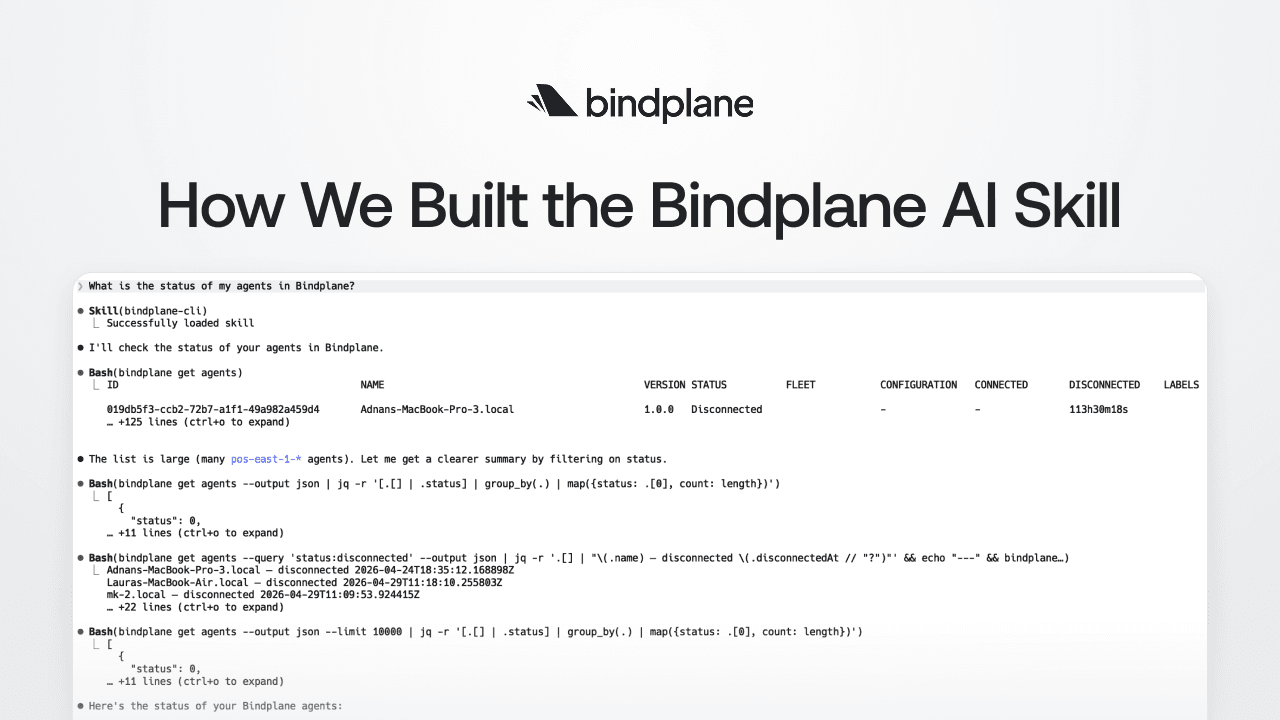
No tool schema or MCP server is needed. The skill loaded, and Claude Code got to work. It started with bindplane get agents, the obvious first move. The list came back large, so rather than dump 125+ lines into context, it immediately pivoted:
- First, filter by status
- Then, group by count and get a clean summary
A second pass pulled disconnected agents with timestamps. A third confirmed the full fleet count.
The final output was an incident summary:
- 9,987 connected
- 9 in error (all the same upgrade failure)
- 4 disconnected (3 developer laptops, 1 stale)
It flagged the error pattern as a likely corrupted upgrade artifact and suggested the next two commands to investigate.

Then the follow-up:
"Can you help me understand why the 9 agents had upgrade failures?"
This is where it got interesting. The agent tried bindplane get agent pos-east-1-1033 by name — got a 404, recognized that the CLI expects IDs not names, fetched the right ID from the earlier output, and retried. No prompting, no error message passed back to me. It self-corrected and moved on.
From there it pulled agent metadata, cross-referenced agent versions, and ran a fleet-wide version distribution query. What came back wasn't just a restatement of the error, it was a root cause analysis. The 9 failing agents had been issued a separate upgrade order targeting latest, which at the time resolved to v1.92.2. The other 1,970 agents were mid-rollout on a pinned v1.95.0 target and hitting no issues. The hash mismatch was a stale package manifest for v1.92.2, not a network or permissions problem.

The fix it recommended was specific. Re-issue those 9 agents onto the v1.95.0 path with their exact IDs. It even noted the broader rollout was mid-flight, not stalled. The fleet was healthy, just carrying 9 casualties from an older rollout.
Two prompts. A senior-engineer-level diagnosis. That's the bar we were aiming for, and we're glad to have hit it.
Now, since you saw it works in real life, let me dig deeper into why we opted for a skill rather than an MCP server.
Why Not MCP?
Model Context Protocol is genuinely compelling on paper. Define a set of tools, hand them to the model, let it figure out the rest. However in our day-to-day use, two problems kept showing up.
Accuracy
Using GitHub's MCP, we'd regularly get poor results. Token permission issues, malformed requests, the model occasionally calling the wrong tool entirely. It consistently felt like we were burning more tokens than necessary for simple operations. The abstraction between "what I want to do" and "how the MCP calls the API" introduced enough friction to make the experience unreliable.
Context Window Consumption
MCPs are context-hungry. In a fresh Claude Code session, loading Linear's MCP consumed close to 10% of the context window before we'd written a single prompt (this was pre-1M context). That's a tax you pay every session, every project, every tool.
Once you start using the MCP, the burn accelerates. Tool definitions, your messages, every tool call, every verbose JSON response… it all stays in the window. Retries from incorrect formatting or tool selection compound it further.
I kept asking myself:
Is there a better way to give AI tools the knowledge they need to work with Bindplane?
Hugging Face's CLI Skill and Google’s Validation
The answer came from seeing what Hugging Face did for their CLI. They published a simple markdown file — a "skill" — that an AI tool could load to understand the huggingface-cli command set. No MCP, no server, no tool schemas. Just a structured reference document with top-level commands grouped together with brief descriptions.
Simple, effective, and immediately useful.
I checked it out and thought:
We use Golang's cobra library to build our CLI. We can generate this same artifact automatically, straight from our command tree.
Shortly after we shipped the Bindplane AI Skill, Google released AI skills for Google Workspace CLI tools with a very similar pattern. The timing was a coincidence, but the signal was clear. The industry is converging on this approach. MCP isn't dead, but a high-quality CLI, well-documented and exposed as a skill, may be the better approach in many situations.
Skill vs. MCP: A Quick Mental Model
Before going further, it's worth drawing a clear line.
An MCP describes what tools are available, when to use each one, and the exact input schema for every call. That richness is also its weakness. It doesn't scale. As your API surface grows, the MCP payload grows with it, and it's in the context window whether the AI needs it or not.
A skill is a localized, domain-specific set of instructions for accomplishing a specialized task. The critical difference is a skill's content only enters the context window when it's relevant. Initially, the AI is only aware of the skill's descriptive frontmatter and intended use cases. And because CLIs are designed to be terse and precise, a well-structured skill document can be remarkably effective with a surprisingly small footprint.
Skills scale. MCPs, in our experience, don't.
How We Built It
Architecture: Build-Time Generation With //go:embed
The Bindplane skill isn't generated on the fly. It's generated at build time, embedded in the binary using Go's //go:embed, and written to disk by bindplane skill install.
It's very similar to our API Swagger definition, effectively another form of API documentation. It's a build artifact you source-control, validate in CI, and version alongside the binary. Generating it from the live Cobra command tree means it's always accurate; if a command changes, the skill changes with it.
The version is stamped into the skill as an HTML comment that's invisible to AI tools but machine-readable by bindplane skill update:
1<!-- bindplane-skill-version: v1.2.3 -->Clean separation between what the AI sees and what the CLI needs to manage lifecycle.
Format: Tables, Not Bullets
We improved on the Hugging Face pattern by using markdown tables instead of bullet lists. Tables let us document optional arguments alongside each command — description, command, and arguments in three columns — without the document feeling bloated. Commands are grouped by top-level subcommand, with a separate global arguments table at the top.
The result was a skill file under 300 lines that covers the entire CLI surface.
Multi-Platform: Four Tools (Then Five), One Embedded File
We initially targeted Claude Code, Codex, Cursor, and OpenCode. Gemini followed shortly after. This space is evolving fast, and each tool has its own expected folder structure and file naming conventions. The naming conventions are honestly the messiest part of multi-platform support, though the industry is starting to converge on standards for agent locations.
Because the content is embedded in the binary, we abstract this away by simply copying the file to the well-known location for each tool. bindplane skill install prompts interactively for platform and scope when flags are omitted, so the zero-flags experience just works. Pick your tool, pick user-level or project-level, done.
How We Use AI Without Shipping AI Slop
We built this feature almost entirely with AI coding agents. We're not shy about that. We think AI-assisted development is the future and we lean into it across our engineering org. But "built with AI" doesn't have to mean "built carelessly."
The pipeline looks like this:
Spec → Tasks → Branches → Stacked PRs → AI + Human Review → Ship
Each stage has specific tooling and guardrails.
It Starts With a Spec
Before any code gets written by an AI, we write a specification. We draft the spec collaboratively with Claude, then iterate on it. For the skill feature, the spec covered the generation format, install paths per platform, the versioning strategy, and the update lifecycle. The spec, the generated plan, and the resulting tasks all live in the repo alongside the code.
Our workflow integrates with Linear, so tasks are automatically tracked and visible to our product team. This bridges the gap between "what engineering is building" and "what product is tracking" without anyone manually syncing status.
This matters because AI agents are remarkably good at executing against a well-defined plan. And defining a plan up front allows for a human-in-the-loop to review what will be done before the agent starts. The spec is the guardrail that keeps the agent building what you actually want instead of what it thinks you want. And most importantly, a spec gives a code reviewer context about the code that they will be reviewing.
Test-Driven Development as a Constraint
We have the AI generate tests before writing code, and we explicitly instruct it to consider edge cases and ambiguities. TDD gives the agent a tight feedback loop — write code, run test, see failure, fix — which produces more focused output. Our existing suite of thousands of tests acts as an automated guardrail that keeps the agent from drifting off course.
Automated Guardrails: Claude Code Hooks
We don't rely on AI to write clean code on its own. AI is a great code generation tool, but a bad linting tool. We use Claude Code hooks, specifically a custom bash script that runs as a PostToolUse hook on every file edit or write. The hook enforces gofmt and golangci-lint for our Go code, and our linting standards for TypeScript on the UI side. If the AI generates code that doesn't meet standards, it gets immediate feedback and fixes it before moving on.
The advantage over pre-commit hooks: Claude Code hooks live in the repo's settings.json, so they're automatically enforced for every developer. No individual setup, no "works on my machine." When a new engineer clones the repo and starts using Claude Code, the guardrails are already in place.
Small PRs With Stacked Reviews
Each task becomes its own branch and PR by default, stacked using Graphite. This gives us small, focused pull requests that are easy to review for both humans and AI agents. AI-assisted code review really shines on small PRs. Where a 2,000-line PR overwhelms everyone, a 200-line PR with clear scope gets meaningful feedback.
Developers retain full control over how the stack is organized. Some tasks produce PRs so small they aren't worth the CI compute, so we fold them into another branch with the Graphite CLI. Putting that control in developers' hands means they exercise judgment. At the end of the day, developers are responsible for the code they ship, whether it was written by hand or generated by an agent.
The Whole Pipeline
Specs prevent architectural drift. Tests create tight feedback loops. Hooks enforce consistency on every change. Small stacked PRs make review tractable. The AI does the heavy lifting; automated tools enforce standards; human reviewers focus on the things that genuinely require human judgment — architecture, UX, business alignment, edge cases, and whether the code tells a clear story.
Nothing ships without human sign-off. If you're using AI coding agents seriously, invest in the infrastructure around them. Specs, tests, hooks, stacked PRs — these aren't overhead, they're what make AI-assisted development work at a quality level you'd be proud to ship.
The Most Interesting Part: A CLI That Aligns Human and AI Interests
This is the insight we didn't expect when we started, and the one we want to leave you with.
Every developer knows the pain of keeping documentation in sync with code. Docs slip behind. Examples go stale. The "Getting Started" guide references a flag that was renamed two releases ago. Documentation work is real work, and it consistently loses to the next feature on the roadmap.
The CLI-as-skill pattern collapses that tension entirely.
When your skill is generated from your CLI's command tree, improving the AI's experience and improving the human's experience become the same activity. Better flag descriptions help your AI assistant pick the right invocation — and they also show up in --help for the developer reading the terminal. Clearer subcommand grouping makes the skill easier for an AI to navigate and makes the CLI easier for a human to learn. Adding examples to your Cobra commands feeds both audiences at once.
For years, we've talked about CLIs as a developer experience surface. Now they're an agent experience surface too — and crucially, the same investments pay off in both directions. There's no tradeoff. Time spent making the CLI more legible to humans makes it more legible to AI. Time spent making it easier for AI to use makes it more discoverable for humans.
A symbiotic, mutually beneficial relationship between humans and AI is the outcome we all hope to achieve. With CLIs, we may have stumbled into one of the cleanest examples of it.
The Bindplane AI Skill proves that a well-documented CLI can outperform a full MCP integration — less context overhead, more reliable results, and an assistant that navigates your platform like it's been using it for years. Building it also surfaced something we didn't expect: every improvement you make to your CLI for humans pays off equally for AI, and vice versa. If you're running Bindplane CLI v1.98+, run bindplane skill install and see for yourself.
Bindplane is a platform for building and deploying OpenTelemetry-based telemetry pipelines at scale. Learn more, here.


 Slack
Slack GitHub
 x.com
x.com LinkedIn