How to Install and Configure an OpenTelemetry Collector

Originally published June 2024. Updated May 2026.
A lot has changed since the first version of this guide. In May 2026, OpenTelemetry officially graduated within the CNCF, the highest maturity level a project can achieve. All three core signals (metrics, logs, and traces) are now stable across every major language SDK. Collector adoption has never been higher, and the ecosystem around it, particularly OpAMP for remote management, has matured significantly.
This update walks through three things:
- A brief overview of OpenTelemetry and the OpenTelemetry Collector
- Installing, configuring, and shipping observability data with the Collector
- New in 2026: how to use OpAMP and Bindplane to manage collectors at scale
OpenTelemetry: A Brief Overview
What is OpenTelemetry?
The OpenTelemetry (OTel) project is now a graduated CNCF project, a milestone it reached in May 2026 after moving from Sandbox (2019) to Incubating (2021) to Graduated. It is an open-source framework that standardizes how observability data (metrics, logs, and traces) is gathered, processed, and exported. OTel focuses on observability data and enables a vendor-agnostic pipeline to almost any back-end for insight and analysis.
Graduation reflects the breadth of production adoption. OpenTelemetry is now natively integrated across Google Cloud, AWS, Azure Monitor, Dynatrace, ClickHouse, Honeycomb, and many other platforms.
What is an OpenTelemetry Collector?
The OpenTelemetry Collector is a service responsible for ingesting, processing, and transmitting observability data. Data flows between sources, components, and back-ends using a standardized protocol known as the OpenTelemetry Protocol ("OTLP"). The Collector can be installed locally as a traditional agent, deployed remotely as a standalone collector, or run as an aggregator ingesting data from multiple collectors.
Benefits of Using an OpenTelemetry Collector
OpenTelemetry provides open-source tooling for collecting telemetry data from distributed systems and applications. It replaces proprietary agents and ad-hoc configurations with a single vendor-neutral framework backed by a broad ecosystem of vendors and contributors. Through its SDKs, integrations, and distributions, the Collector consolidates fragmented telemetry pipelines into a single, controllable pipeline.
Related content: Why OpenTelemetry?

Bindplane's Contributions to OpenTelemetry
Bindplane (formerly observIQ, recently acquired by Dynatrace) has made several significant contributions to the project:
- In 2020, observIQ donated the open-source log agent Stanza. The code was further developed and established as the core logging library for the OpenTelemetry Collector in 2023.
- Bindplane has contributed to and improved over 40 Receivers, Processors, and Exporters for technologies including Azure, CloudFlare, NGINX, and Windows Events.
- Bindplane made significant contributions to Connectors, which enable advanced routing between metric, log, and trace pipelines within the collector.
- Bindplane played a key role in designing and implementing the OpenTelemetry Agent Management Protocol (OpAMP), the foundation of the remote management section at the end of this post.
- In 2023, Bindplane launched Bindplane, a purpose-built observability pipeline platform for OpenTelemetry.
Primary Components of the OpenTelemetry Collector
- Receivers: ingest data into the collector
- Processors: enrich, reduce, and refine the data
- Exporters: send the data to another collector or back-end
- Connectors: connect two or more pipelines together
- Extensions: expand collector functionality in areas not directly related to data collection, processing, or transmission
You link these components together to define a data pipeline in the collector's configuration.
Collecting and Exporting Host Metrics and Logs
Let's start with the basic but important task of monitoring the health and performance of a Linux host. This means collecting host metrics and logs, then shipping them to a back-end for visualization and analysis.
How to Get Started
- A Linux host with superuser privileges (any modern distribution will work).
- A back-end. For this example, I'm using Grafana Cloud because it has a free tier with a native OTLP endpoint, which simplifies configuration.
- Your Grafana Cloud access policy token, instance ID, and region. Set these up by following this guide (takes about 5 minutes).
Installing the OpenTelemetry Collector
The current stable release of the OpenTelemetry Collector Contrib distribution is v0.152.0. Run the following on a Debian or Ubuntu host:
1sudo apt-get update
2sudo apt-get -y install wget systemctl
3wget https://github.com/open-telemetry/opentelemetry-collector-releases/releases/download/v0.152.0/otelcol-contrib_0.152.0_linux_amd64.deb
4sudo dpkg -i otelcol-contrib_0.152.0_linux_amd64.debSubstitute the version with the latest release as they become available.
Once complete, otelcol-contrib is managed by systemd and starts automatically. The configuration file lives at /etc/otelcol-contrib/config.yaml.
Reviewing the Default Configuration
If you're already familiar with the default configuration, skip ahead to Configuring the Collector.
The default config.yaml includes pre-configured components and a sample pipeline so you can understand the syntax.
1cat /etc/otelcol-contrib/config.yamlSecurity note: The default config binds several receivers to 0.0.0.0, which exposes them on all network interfaces. For production, replace 0.0.0.0 with a specific interface address to reduce your attack surface. See the OTel security best practices for guidance.
Extensions
1extensions:
2  health_check:
3  pprof:
4    endpoint: 0.0.0.0:1777
5  zpages:
6 endpoint: 0.0.0.0:55679health_check: exposes an HTTP endpoint with collector statuspprof: exposes anet/http/pprofendpoint for profiling the collector processzpages: exposes an HTTP endpoint for debugging collector components
Receivers
1receivers:
2  otlp:
3    protocols:
4      grpc:
5        endpoint: 0.0.0.0:4317
6      http:
7        endpoint: 0.0.0.0:4318
8  prometheus:
9    config:
10      scrape_configs:
11        - job_name: 'otel-collector'
12          scrape_interval: 10s
13          static_configs:
14            - targets: ['0.0.0.0:8888']
15  jaeger:
16    protocols:
17      grpc:
18        endpoint: 0.0.0.0:14250
19      thrift_binary:
20        endpoint: 0.0.0.0:6832
21      thrift_compact:
22        endpoint: 0.0.0.0:6831
23      thrift_http:
24        endpoint: 0.0.0.0:14268
25  zipkin:
26 endpoint: 0.0.0.0:9411otlp: ingests OTLP-formatted data from an app, system, or another OTel collectorprometheus: ingests metrics in Prometheus format, pre-configured to scrape the collector's own endpointjaeger: ingests trace data in Jaeger formatzipkin: ingests trace data in Zipkin format
The OpenCensus receiver has been phased out of contrib as OpenCensus was officially sunsetted. If you're still using OpenCensus instrumentation, now is a good time to migrate to OpenTelemetry SDKs.
Processors
1processors:
2 batch:batch: transmits telemetry data in batches rather than streaming each individual data point
Exporters
1exporters:
2  debug:
3 verbosity: detaileddebug: writes collector data to the console. Useful for verifying your config is working. Thedebugexporter replaced theloggingexporter, which was removed inv0.111.0(October 2024). If you have older configs that referencelogging, replace it withdebug.
Service
1service:
2  telemetry:
3    metrics:
4      readers:
5        - pull:
6            exporter:
7              prometheus:
8                host: '127.0.0.1'
9                port: 8888
10                without_scope_info: true
11                without_type_suffix: true
12                without_units: true
13                with_resource_constant_labels:
14                  included: []
15  pipelines:
16    traces:
17      receivers: [otlp, jaeger, zipkin]
18      processors: [batch]
19      exporters: [debug]
20    metrics:
21      receivers: [otlp, prometheus]
22      processors: [batch]
23      exporters: [debug]
24    logs:
25      receivers: [otlp]
26      processors: [batch]
27      exporters: [debug]
28 extensions: [health_check, pprof, zpages]service: where pipelines are assembled. A component is not enabled unless referenced here.telemetry: configures the collector's own internal telemetry. By default it exposes a Prometheus metrics endpoint at127.0.0.1:8888. As of recent releases this is127.0.0.1, not0.0.0.0, a security improvement.pipelines: reference the receivers, processors, and exporters above. Some components can be shared across pipelines. The default config includes all three signal types: traces, metrics, and logs.extensions: enabled here separately from pipelines.
Configuring the Collector
Now update the config:
1vim /etc/otelcol-contrib/config.yamlHere's a clean configuration that collects host metrics and logs, then ships them to Grafana Cloud via OTLP:
1extensions:
2  basicauth: # authenticates to the Grafana Cloud OTLP endpoint
3    client_auth:
4      username: <Grafana Cloud Instance ID>
5      password: <Grafana Cloud Access Policy Token>
6
7receivers:
8  hostmetrics: # collects host metrics from the specified categories
9    collection_interval: 1m
10    scrapers:
11      cpu:
12      disk:
13      memory:
14      network:
15  filelog: # reads a log file, starting from the end
16    start_at: end
17    include: [/var/log/syslog]
18
19processors:
20  batch:
21  resourcedetection: # detects and adds hostname as resource metadata
22    detectors: ["system"]
23    system:
24      hostname_sources: ["os"]
25
26exporters:
27  otlphttp: # exports data in OTLP format
28    endpoint: https://otlp-gateway-prod-us-central-0.grafana.net/otlp
29    auth:
30      authenticator: basicauth
31
32service:
33  extensions:
34    - basicauth
35  pipelines:
36    metrics:
37      receivers: [hostmetrics]
38      processors: [batch, resourcedetection]
39      exporters: [otlphttp]
40    logs:
41      receivers: [filelog]
42      processors: [batch, resourcedetection]
43 exporters: [otlphttp]Once the config has been updated, restart the collector and review the output:
1systemctl restart otelcol-contrib && journalctl -f --unit otelcol-contribIf all is well, the console will show activity indicating the collector has restarted and data is flowing.
Finding Your Observability Data in Grafana Cloud
Open Grafana and go to the Explore console. Grafana Cloud automatically maps and routes OTLP data to Prometheus (metrics) and Loki (logs) data sources.
Finding Your Metrics
Choose the Prometheus data source linked to your OTLP access policy. Metric names correspond to the scrapers you configured (for example, system.cpu.utilization, system.memory.usage).

Finding Your Logs
Select the Loki data source associated with your OTLP access policy, then set exporter = OTLP as the label filter.

That's it. You've installed, configured, and shipped observability data using the OpenTelemetry Collector. From here, you can customize the configuration, build dashboards, and create alerts.
Going Further: Remote Management with OpAMP and Bindplane
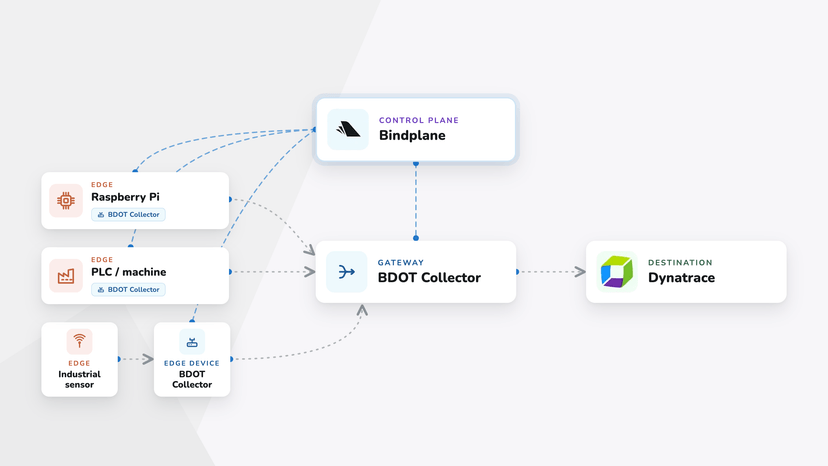
Managing one collector by hand is fine. Managing dozens or hundreds is not. OpAMP (Open Agent Management Protocol) is the OTel project's answer: push config, monitor health, and manage the collector lifecycle remotely over a single connection.
Under the hood, each collector opens an outbound WebSocket connection to the OpAMP server, so there are no inbound ports to manage on the agent side. Config changes, health reports, and lifecycle commands all flow over that one channel. For a deeper look at the protocol and the new OpAMP gateway extension, see OpAMP for OpenTelemetry: Managing Collector Fleets.
You need an OpAMP server (Bindplane) and a collector that speaks OpAMP. Two paths.
Use the Bindplane Distribution for OpenTelemetry Collector
The fastest path. BDOT was the first distribution to implement OpAMP and speaks it natively. One command installs the collector and registers it with your Bindplane control plane:
1sudo sh -c "$(curl -fsSlL https://github.com/observIQ/bindplane-otel-collector/releases/latest/download/install_unix.sh)" install_unix.sh \
2  -e <your_endpoint> \
3 -s <your_secret_key>BDOT includes every component in otelcol-contrib, plus the Bindplane-maintained receivers and processors for enterprise observability and security workloads. Once registered, push configs to one agent or thousands at once from the Bindplane UI. See the Bindplane installation docs for Windows, macOS, Docker, and Kubernetes.
Build Your Own Collector
For custom builds with different components or your own release cadence, use the OpenTelemetry Collector Builder (OCB) or Bindplane's wrapper around it, otel-distro-builder, which handles cross-platform packaging (deb, rpm, MSI, Docker images). Pair the output with the OpAMP Supervisor and Bindplane manages it the same way it manages BDOT.
A practical shortcut: if you already have a working config.yaml (like the one we built earlier), the otel-distro-builder CLI can generate a minimal manifest and build a custom distribution from it, including only the components your pipeline actually uses. Generate just the manifest:
1otel-distro-builder --from-config config.yaml --generate-onlyOr do both in one step by dropping --generate-only and specifying target platforms:
1otel-distro-builder --from-config config.yaml --artifacts ./artifacts --platforms linux/amd64,linux/arm64Either way, you end up with a slim collector sized to your pipeline, with nothing extra to maintain.
Check out a full, step-by-step walkthrough, including the OCB manifest, GitHub Actions setup, and Bindplane Agent Type configuration, here. Or, check out this workshop, below.
OpenTelemetry Is the Standard. Now Operate It Like One.
OpenTelemetry's CNCF graduation in May 2026 marks a turning point. This is no longer a bet on an emerging standard. It is the standard. Whether you're starting with a single collector or scaling to hundreds, the path is the same: install, configure, and when you're ready to operate at scale, layer in OpAMP and Bindplane to manage your fleet remotely.
Feel free reach out to the Bindplane team in the Community Slack if you need help getting started, or if you have questions.




 Slack
Slack GitHub
 x.com
x.com LinkedIn